View: 2271|Reply: 2

Telink IoT Studio如何进行命令行编译

[Copy link]

5

Threads

80

Replies

404

Credits

Credits
404
Posted on 2025-5-16 16:18:18 | Show all posts |Reading mode From 广东深圳
如附件

Telink IoT Studio如何进行命令行编译.pdf

761.82 KB, Downloads: 32

10

Threads

12

Replies

153

Credits

Credits
153
Posted on 2026-1-27 12:30:07 | Show all posts From 广东深圳
怎么在命令行使用 cmake 进行编译?

2

Threads

22

Replies

156

Credits

Credits
156
Posted on 2026-8-11 16:40:52 | Show all posts From 上海
本帖最后由 TL_WXS 于 2026-8-11 16:48 编辑

导出 Toolchain 环境变量
Linux 下不用导出环境变量,Windows 下需要。导出 2 个环境变量:Cygwin 环境和编译工具链环境。
export PATH=$PATH:/home/user/toolchain_v53x_v5f/nds32le-elf-mculib-v5f/bin;/home/user/toolchain_v53x_v5f/cygwin/bin

CMake Configure
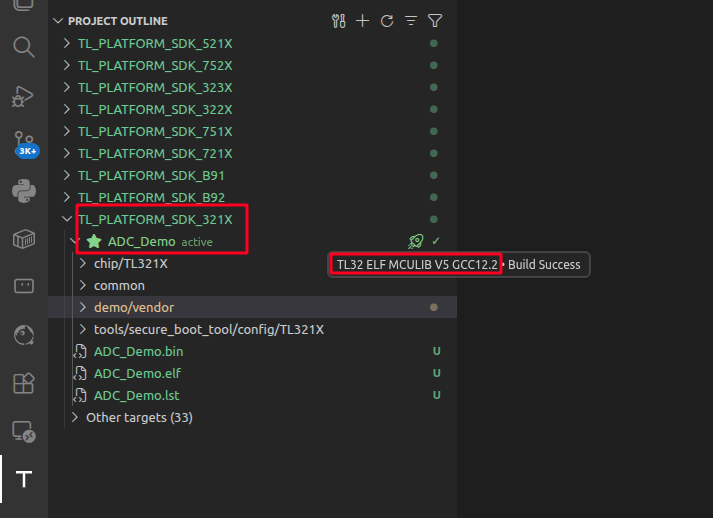
  • PROJECT_NAME:工程名称(可在 cmake_configs/*._cmake.json 中name查看)。
  • TOOLCHAIN_NAME:目标使用的工具链(可在 *cmake.json 文件中toolchainVersionName查看)。
  • image.png
  • TOOLCHAIN_PATH:编译工具链路径,指定到 bin 文件夹的父目录。
  • CMAKE_C_COMPILER_FORCED:配置为 1,跳过 CMake 配置阶段 gcc 检查。
  • -S:CMakeLists.txt文件的目录。
  • -B:中间文件目录,可自定义。

注意:
  • 不同工程需要不同的中间存储目录。

cmake -S ./tl_platform_sdk -Wno-dev -DPROJECT_NAME=TL_PLATFORM_SDK_321X -DTOOLCHAIN_NAME="TL32 ELF MCULIB V5 GCC12.2" -DTOOLCHAIN_PATH=/home/user/toolchain_v53x_v5/nds32le-elf-mculib-v5 -B cmake_builds/TL_PLATFORM_SDK_321X -G "Unix Makefiles" -DCMAKE_C_COMPILER_FORCED:STRING=1

CMake Build

cmake --build cmake_builds/TL_PLATFORM_SDK_321X --target ADC_Demo -j8

或者通过脚本编译

export TOOLCHAIN_PATH=/home/user/toolchain_v53x_v5/nds32le-elf-mculib-v5
run_cmake.sh TL_PLATFORM_SDK_321X ADC_Demo


run_cmake.sh

3.21 KB, Downloads: 0

Credit rules for this forum

Follow our WeChat
Privacy Policy|Telink Developer Community

For copyright infringement reports, complaints or suggestions, please email forum@telink-semi.com

Powered by Discuz! X5.0 © 2001-2026 Discuz! Team.|沪ICP备17008231号-1 |沪公网安备31011502403548号

inThis forumPostBack to top