|
Hi everyone, I'm using Telink BDT v5.8.5 and the command line tool Cmd_download_tool.exe to flash TLSR8258-based devices (via TC32 EVK, Swire interface). When I use the GUI version of BDT, I Can get this output :
TC32 EVK: Swire ok flash mid = 0x001460c8, flash status = 0x0000, lock area: 0x00000000-0x00000000 flash uid: 41 50 33 32 36 36 32 07 00 c0 00 f3 ff ff ff ff Total time: 761 ms
However, I’d like to get this same information (flash UID) using the command-line interface (CLI). I’ve checked the available commands with:
Cmd_download_tool.exe help
and I see options like:
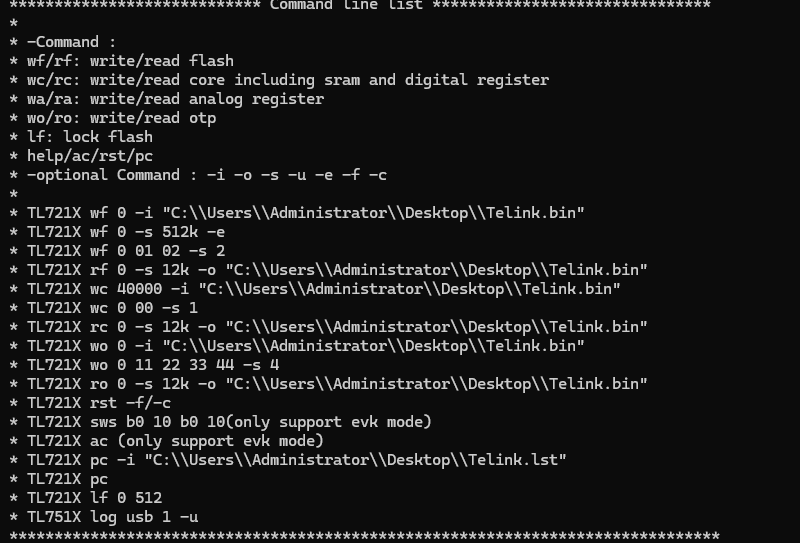
I’m not sure if there is a correct or recommended method to read flash info, or if there’s another CLI command that directly prints the flash MID/UID like the GUI does. Can anyone from Telink or the community confirm the correct usage or show an example command for reading flash info via CLI?
|

 简体中文
 繁體中文
 English
 日本語
 Deutsch
 한국 사람
 بالعربية
 TÜRKÇE
 português
 คนไทย



 Posted on 2025-10-28 20:00:29

 Posted on 2025-10-31 16:31:47